
This article applies to BOOST EMPOWER licenses
Purpose of the article
Archiving, classification, ticketing, and buffering features are also available in your Microsoft Outlook email tool. This article explains how to configure Outlook to integrate the Cooperlink plugin. This procedure applies to only one user.
Deployment for multiple users?
Please refer to Deploy outlook plugin from Office 365 admin center to configure the Outlook plugin for all or part of your organization.
Prerequisite
Configuring the Outlook plugin requires:
- The matching feature must be active (please consult your site administrator)
- Please note the URL of your Cooperlink installation (e.g. https://cooperlink.mycompany.com)
Install the Outlook add-in (desktop application)
On the Outlook ribbon, click Download Add-ins

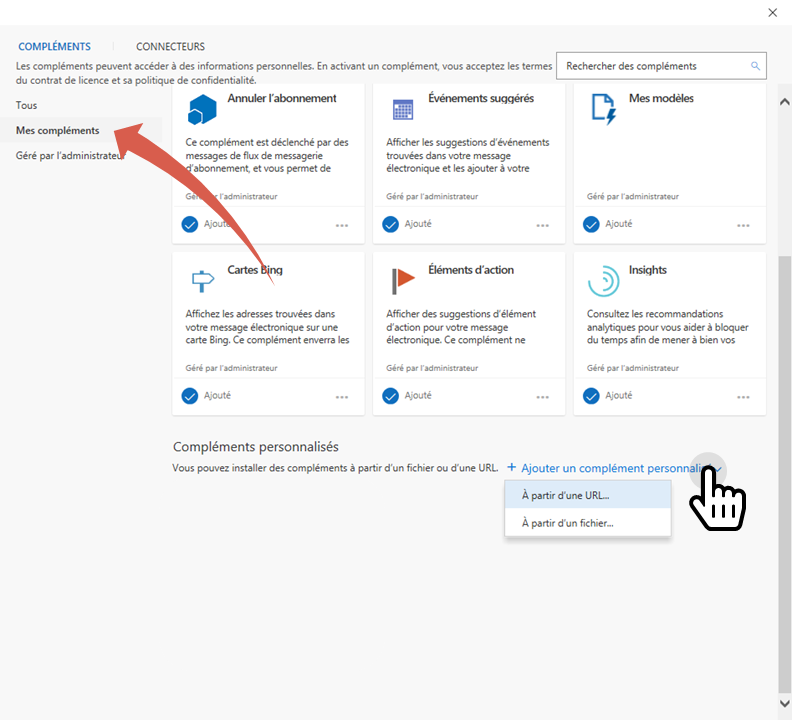
In the dialog window, select My Add-ins. Then click Add Custom Add-in. Select the Menu From URL...
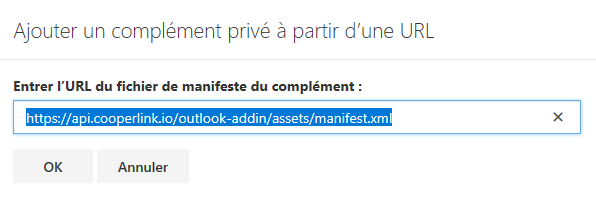
Specify the following URL: https://outlook-addin.cooperlink.io/assets/manifest.xml
Then validate.
Congratulations, the Outlook plugin is now installed. It is visible from the Outlook ribbon.
To continue, please proceeed to following actions: